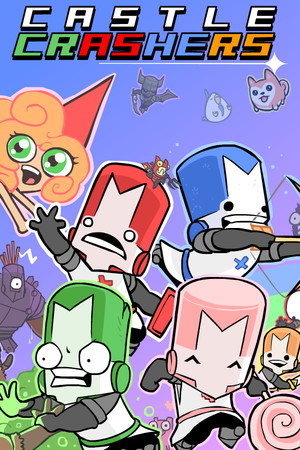
The game is rated Teen on Steam for cartoon violence, animated blood, and online interactions. Unofficial mobile downloads may also create account, malware, or payment risks.
Fast answer
The answer before the background
There is no official native iPhone or iPad version available through the App Store. The legitimate route is to buy or install the PC version through Steam, then stream it to your iPhone or iPad with Valve’s Steam Link app. The host computer runs the game while the Apple device receives the video and sends back your controls. This is remote play, not a standalone castle game download, and it requires the computer to remain available during play.
Verified answer
Is there a native App Store release?
No. The official game website currently directs players to the Steam release and console storefronts, while the Steam listing provides Windows and macOS system requirements. Neither official listing identifies an iOS or iPadOS build from The Behemoth.
That means searches for a castle-themed app with a similar name should not be treated as proof of an official port. A genuine native release would normally have a clear publisher listing, the original developer or publisher identity, supported Apple operating systems, and a matching product description. Those details are not available for a standalone iPhone game here.
- There is no verified native App Store download for the full game.
- The iPhone and iPad can be used as streaming clients through Steam Link.
- You still need access to a Windows, Mac, or Linux computer running Steam.
| Option | What it provides | What you need |
|---|---|---|
| Native App Store app | Not verified as available | Nothing, but no official full-game listing is currently confirmed |
| Steam Link streaming | The PC version displayed on an iPhone or iPad | A computer running Steam, the game, and a suitable network |
| Console version | A native console experience | A supported console rather than an Apple mobile device |
Steam Link is the official mobile access route, but it does not install the game on your phone. The game remains installed and running on the host computer.
Official route
How to play on an iPhone or iPad
Use Valve’s Steam Link app rather than an unverified mobile installer. Apple lists the app for iPhone and iPad, and Valve says it connects an iOS device to a computer running Steam. The normal setup uses the same local network for the computer and mobile device.
For the best result, connect the computer to the router with Ethernet and place the iPhone or iPad on a stable 5 GHz Wi-Fi connection. A wired or low-interference network reduces delay, but streaming quality still depends on your router, computer, distance, and local network traffic.
- Install Steam on a Windows, Mac, or Linux computer and sign in.
- Install the PC version from Steam and launch it once on the computer.
- Install Steam Link from the Apple App Store on the iPhone or iPad.
- Pair the app with the computer using the on-screen code.
- Select the game in the Steam Link library and choose the streaming option.
- Test the controls before starting a long campaign or online session.
| Device | Verified use | Compatibility note |
|---|---|---|
| iPhone | Steam Link streaming | The App Store listing supports iPhone devices running iOS 11 or later, subject to Apple’s current listing |
| iPad | Steam Link streaming | The App Store listing supports iPad devices running iPadOS 11 or later, subject to Apple’s current listing |
| Computer | Runs the actual game | Steam lists Windows and macOS requirements; Linux hosting may depend on the current Steam setup and compatibility layer |
A Bluetooth or MFi-compatible controller is usually preferable for fast combat. Steam Link also offers touch controls, but they may feel less precise for blocking, juggling, magic, and four-player action.
Practical checks
Before you install anything
First, check the publisher and product name. The original game is associated with The Behemoth, and the official Steam listing uses the full title and identifies the developer and publisher. If an App Store result uses a different developer, promises a free full port, or asks you to install a profile or download an external file, treat it as unrelated or unsafe until verified.
Second, check whether you actually need mobile streaming. If you want a game that runs independently while travelling, Steam Link will not meet that requirement because the computer must host the session. It is best for playing around the home or wherever your host PC and network connection are reliable.
Finally, update Steam, the host computer, the Steam Link app, and your controller firmware before troubleshooting. Older app versions can have different menus and streaming behavior, so follow the current in-app pairing instructions rather than an old video guide.
- Do not enter Steam credentials into a third-party download page.
- Do not install configuration profiles offered by unknown sites.
- Do not assume a similarly named castle game is the original beat ’em up.
- Check the App Store seller, compatibility section, and privacy details before installing a companion app.
The absence of a native listing is a current availability finding, not a promise that The Behemoth can never release an iOS version. Recheck the official site and App Store if a future announcement is made.
Choice guide
Which access method is right for you?
Choose Steam Link if you already own a computer copy and want to use an iPhone or iPad as a portable screen and controller. It preserves the PC game’s content because the host computer is running the original build.
Choose a console or computer directly if you want the most dependable controls, local multiplayer setup, or play without relying on mobile streaming. An iPhone case, wallpaper, or other fan-made accessory may be useful for presentation, but it does not provide a playable mobile version.
For online or local co-op, test input latency first. A strong connection and a physical controller are more important than screen size. An iPad gives you a larger display, while an iPhone is easier to carry, but neither changes the requirement for a host computer.
- Best for an iPhone: short sessions with a controller and a nearby host computer.
- Best for an iPad: a larger streamed display, especially with a stand and controller.
- Best for native play: use the PC or a supported console instead of searching for an unofficial mobile port.
FAQ
Common questions
Can I download the full game directly from the iPhone App Store?
Not as a verified native release from The Behemoth. The legitimate App Store download is Valve’s Steam Link app, which streams a PC copy rather than installing the game itself.
Does it work on iPad?
Yes, an iPad can act as a Steam Link streaming device. You need a computer running Steam, the game installed on that computer, and a network connection suitable for low-latency streaming.
Does it work on iPhone?
Yes, through Steam Link streaming. This is the same remote-play arrangement used on iPad: the computer runs the game, while the phone displays it and sends control input.
Is there an official mobile version or release date?
No official native iOS release or release date is confirmed by the sources checked for this guide. If that changes, verify the announcement through the official game site or a clearly identified App Store listing from the correct publisher.
Can I play without owning the PC version?
No. Steam Link is a streaming client for games in your Steam library. You need a computer with Steam and a playable copy of the game installed or available there.
Sources
What we checked
Official listings establish current availability and product facts. Community pages are used for mechanics and build history, then labeled separately.
- OfficialOfficial Castle Crashers website
- OfficialOfficial Castle Crashers game page
- OfficialCastle Crashers on Steam
- OfficialSteam Support: Apple Steam Link App
- OfficialSteam Link on the Apple App Store